FIFO Rostering and Onboarding Software Buying Guide
6 sections · 8 min readHow to evaluate workforce and roster software for FIFO and DIDO mine sites: swing patterns, fatigue and hours rules, flights and camp beds, competency checks before mobilisation, contractors, and payroll.
Definition
Workforce and roster software for mining plans who works each swing and how they get to site with every check their site requires: roster patterns, fatigue and hours rules, flights or drive-in runs, camp beds, and the inductions and tickets each person needs. For a FIFO operation, the main test is whether one roster change updates the travel booking, the bed, the compliance check and payroll in the same step.
What is Workforce & Roster Management Software?
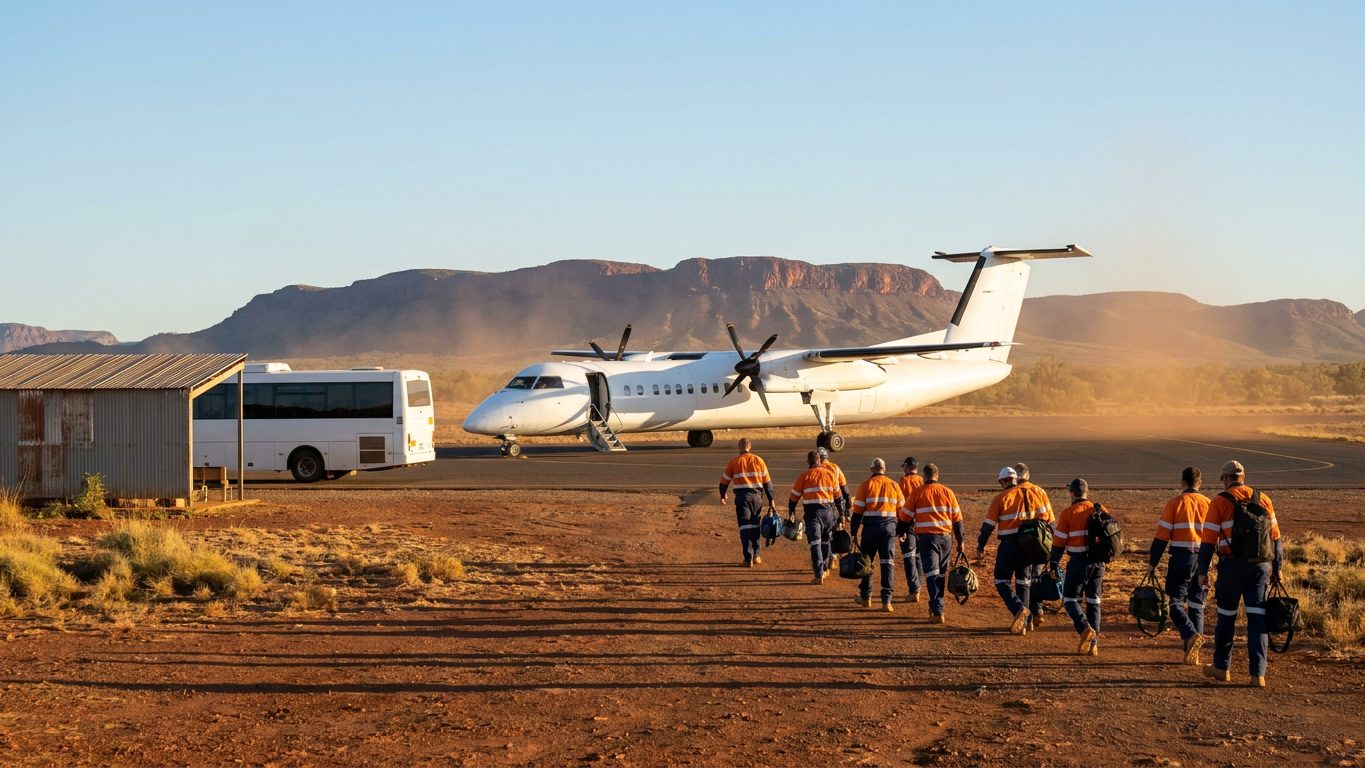
Running a Fly-In, Fly-Out (FIFO) or Drive-In, Drive-Out (DIDO) workforce means keeping people, transport, beds and compliance in step. Workforce and roster management software coordinates employee and contractor rosters, commercial flight bookings, charter flights, camp accommodation (village management), and site compliance requirements.
When a haul truck driver is rostered on a 12-hour night shift, the software should confirm they have a seat on the plane to site, a clean room in the camp, and the current tickets they need to operate the equipment.
As of 11 October 2026, MSR lists 28 products from 17 vendors in the workforce and roster category. They range from full FIFO logistics platforms to single-job tools for camp, travel, competency records, fatigue monitoring, and time and pay.
Signs Your Operation Needs It
If your site administrators are using whiteboards, complex Excel macros, or disconnected travel systems, you are probably paying for empty beds and unused seats:
Symptom
You frequently have "ghost bookings": rooms in the camp that are booked but empty, while contractors sleep in hot-beds or off-site motels.
Reality
Your camp management system is disconnected from your actual flight manifests and daily gate-swipes.
Symptom
Workers arrive on site only to be turned away at the gate because their medical clearance or specific induction ticket expired yesterday.
Reality
Your roster system does not have an automated compliance integration to block travel for non-compliant workers.
Symptom
Managing roster changes (due to sick leave or weather events) requires an administrator to manually update three different systems (flights, camp, payroll).
Reality
You lack an integrated end-to-end workforce logistics platform.
Understanding the Software Landscape
Workforce software runs from generic HR tools to specialised remote-site logistics platforms. Examples below are products listed in the MSR directory, in alphabetical order, described from their listings; they are not a ranking or a shortlist.
Integrated FIFO Logistics Platforms
Purpose-built software that handles roster assignment, flight booking and camp accommodation allocation in one system. Listed examples: Fly2Work, PeopleTray Workforce Management and Quartex Workforce Management (listed as previously known as the INX SAM Suite).
Camp/Village Management
Software focused on the hospitality side of the mine camp: room reservations, check-in, cleaning schedules, maintenance requests, and dining hall forecasting based on occupancy. Listed example: SmartLodge, which describes roster-linked reservations.
Travel & Aviation Management
Systems used to manage charter flight manifests, check-ins, ground transport and baggage limits, often integrating with commercial GDS (Global Distribution Systems) like Amadeus. DIDO sites also use journey management for long road trips. Listed examples: EnRoute and Journey Management System.
Compliance, Competency & Onboarding
Systems that track operator tickets, medicals and site inductions, run contractor onboarding, and confirm that only qualified people mobilise to site. Listed examples: Enterprise Protection Platform, MyPass Organisation Passport and RapidCrews.
Rostering, Time & Payroll
Rostering engines with fatigue and enterprise agreement rules, plus time and attendance tools that feed payroll. Listed examples: CRU Rostering, Humanforce Workforce Management, RosterPro, Timesheet+ and TimeTrex Workforce Management. The category also lists in-cab fatigue monitoring (Eagle Industrial, Guardian) and predictive fatigue risk scoring from roster and time data (Readi). Detecting a drowsy operator, or forecasting fatigue from a roster, is a different job from enforcing hours rules in the roster.
How to Evaluate Workforce & Roster Software
What should a mine look for in FIFO rostering and onboarding software?
Look for one system of record where a roster change moves everything that depends on it. The software should hold your real swing patterns and site fatigue and hours rules, rebook the flight or bus and the camp bed when a swing changes, and block mobilisation until inductions, tickets and medicals are current, for contractors as well as employees. It should feed HR and payroll rather than replace them.
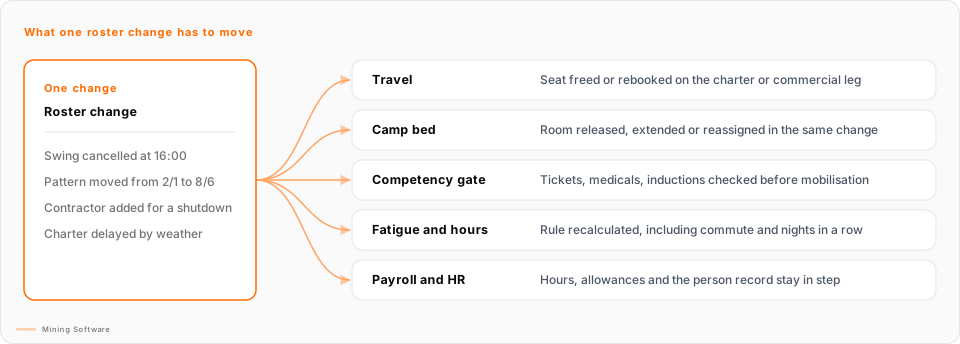
Check these six areas in the demo, using your own rosters and last month's exceptions rather than the vendor's sample data:
1. Swing and roster patterns
Load your real patterns in the demo: even-time and uneven swings (for example 7/7, 14/14, 2/1 and 8/6), day and night rotations, crew panels, and a shutdown overlay. Check that a swap or a sick day shows the knock-on for the rest of the swing.
Common trap: A demo built on one clean 2/1 pattern.
2. Fatigue and hours rules
Rules should be configured to your site procedure and the rules or codes of practice that apply where you operate: hours worked, consecutive shifts and nights, rest between shifts, and commute or travel time. Look for a hard stop that a named person can override with a reason, and a log of both.
Common trap: A traffic-light colour with no visible calculation behind it.
3. Travel and camp booking links
A roster change should move the charter, commercial or bus seat and the camp bed in the same change, free them for the waitlist, and handle a cancelled charter as one bulk action.
Common trap: A travel desk that can issue tickets the roster does not know about, or "we will add camp later".
4. Competency and induction checks before mobilisation
Set requirements by role and site (tickets, licences, medicals, site inductions) and check them before the seat is booked, with expiry alerts ahead of the next swing.
Common trap: Compliance checked only at the gate, after the flight.
5. Contractor onboarding
Contracting companies need their own login to submit people and documents, see only their own crew, and sit under the same fatigue and access rules as employees.
Common trap: A second spreadsheet for contractors, which breaks during a shutdown surge.
6. Payroll and HR integration
Rostered and actual hours, allowances and leave should flow to payroll, and the person record should stay owned by HR. Ask for integrations running in production with systems like yours, and who supports them.
Common trap: A roster tool that tries to replace HR or payroll, or a CSV export nobody owns.
Expect to combine tools. In the MSR directory on 11 October 2026, 13 of the 28 products in this category mention FIFO in their profiles, 11 mention fatigue, 11 mention contractors, 7 mention camp, 5 mention onboarding, 5 mention payroll and 3 mention inductions. On that rough text match, no listing mentions all six areas above and most mention two or three. A profile that does not mention a topic may still cover it, so ask. Where a site runs two or three tools, the integration questions in section 6 decide how well the roster change in the diagram flows through.
Before you sign, run one difficult week in the demo: a sick swing, a delayed charter, a contractor who fails induction, and a bed that was sold twice. Our article on evaluating FIFO roster software for mine sites has the full pre-go-live checklist, including offline camp check-in. Roster, medical and travel data is personal, so also ask the questions in our guide to evaluating mining software vendor security.
Key Performance Metrics to Track:
The right software in this category should measurably improve:
Camp utilisation rate (minimising empty, paid-for rooms).
Reduction in commercial flight cancellation/change fees.
Decrease in administrative hours spent managing roster changes.
Workers turned away at the gate or held back from mobilisation.
Defining the ROI
The ROI for workforce logistics software is mostly cost avoidance and administrative efficiency. It typically comes from:
Optimising Camp Utilisation
Every empty but booked bed is paid for. By eliminating "ghost bookings" and tightening room allocations, a site can see its real occupancy before committing to more camp capacity. Use your own nightly bed cost and occupancy data to size this.
Reducing Flight Wastage
Booking rules tied to the roster reduce last-minute commercial change fees and empty seats on charters.
Ensuring Compliance & Safety
Holding non-compliant workers back before they travel reduces the risk of unqualified or over-hours people on the operation, and avoids paying for a flight and a bed for someone who cannot work.
Key Questions to Ask Vendors
When a shift supervisor changes an employee's roster from a 2/1 to an 8/6 schedule, does your system automatically update their flights and room, or is that a separate manual step?
Tests end-to-end integration. A connected platform moves the flight booking, the camp room and the payroll record with the roster change, so administrators are not updating several systems by hand.
How does your system handle contractors? Can external companies log in to manage their own crew's travel without seeing our internal HR data?
Tests security and contractor access. Contractors can make up a large share of the people on site, especially during shutdowns, so the system needs secure, role-based portals that let contracting companies manage their own rosters and upload compliance documents.
Does your platform integrate directly with commercial airline booking systems (GDS), or do we still need a travel agent to issue tickets?
Tests travel booking. Direct GDS integration (for example Amadeus or Sabre) can reduce reliance on a travel management company for routine bookings and allows rebooking when roster changes occur. Ask which bookings still go through an agent.
Show me how the system handles a weather event where a charter flight is cancelled and 100 people need to be re-accommodated in the camp overnight.
Tests bulk actions and exception handling. The system should support mass rebooking of flights, camp room extensions, and notification to affected workers and their supervisors in a single workflow.
Is this FIFO rostering software, or general workforce management software with a roster screen? Show us a swing pattern, a fatigue rule and a camp bed for the same person.
Tests whether the product is built for FIFO work. General workforce management software for mining often covers time, attendance and pay well. FIFO rostering software also has to hold swing patterns, travel legs and camp beds against the same person. Ask which of these the product owns and which it hands to another system.
Walk us through onboarding a contractor who needs a site induction, current tickets and a medical before their first mobilisation.
Tests onboarding software for mining in practice. The contracting company should be able to submit its people and documents, someone should verify them, and the system should hold the person before the flight or bus is booked, not at the gate. Ask who verifies documents, how expiries are flagged ahead of a swing, and what the contractor can see.
What does your system send to our HR and payroll systems, and which system owns the person record?
Tests integration, not replacement. The roster usually owns who is on site and who is travelling, HR owns the person, and payroll owns pay. Ask for the integration list, the direction of each sync, and what happens when payroll terminates someone who still has a flight booked.
Ready to compare?
See how 28 workforce & roster management products stack up side by side.
Compare 28 ProductsUpdated · Mining Software
Explore Other Categories
Mine Planning & Design
Compare alternatives
Geology & Resource Modelling
Compare alternatives
Simulation & Digital Twins
Compare alternatives
Drill & Blast
Compare alternatives
Fleet Management & Dispatch
Compare alternatives
Mine Operations / SIC
Compare alternatives
Database Management
Compare alternatives
Data & Analytics
Compare alternatives
Exploration & Drilling
Compare alternatives
Environmental, ESG & Compliance
Compare alternatives