Mineral Processing Simulation Software Buying Guide
6 sections · 9 min readWhat a process team should check before choosing mineral processing simulation software: the study it has to support, flowsheet coverage, model calibration, plant data and licensing.
Definition
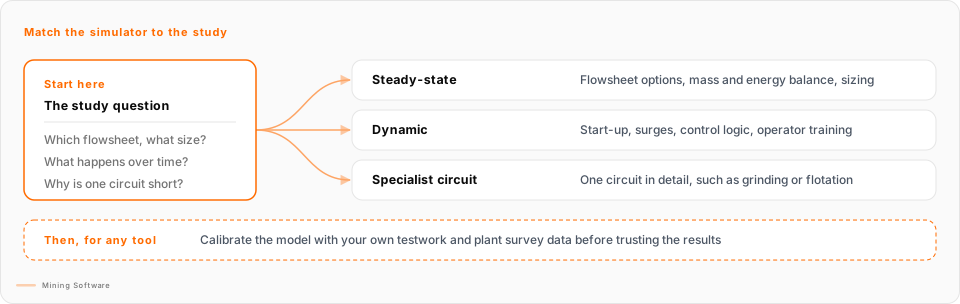
Mineral processing simulation software models a processing plant's flowsheet, from crushing and grinding through flotation, leaching and dewatering, so engineers can test a change before they spend capital on it. Steady-state simulators calculate mass and energy balances for design and flowsheet options. Dynamic simulators show how the plant behaves over time, for start-up, surges, control strategy and operator training.
What is Mineral Processing Simulation Software?
A simulator lets a process team build a model of the plant, feed it ore properties and operating settings, and read off the predicted flows, grades and power draws. Choose by the study in front of you: a steady-state mass and energy balance for design and flowsheet options, a dynamic simulator when timing matters (start-up, surge capacity, control strategy, operator training), and a specialist comminution or flotation model when one circuit is the question.
As of 26 October 2026, the Mining Software directory lists 8 of these tools from 6 vendors: see the mineral processing simulation tools in the directory. All 8 also sit in the simulation and digital twins category.
This category is about the processing plant. Models of haul roads, fleets and whole-of-mine logistics belong to mine-wide simulation and digital twins, which has its own guide.
Signs Your Operation Needs It
A process team usually goes looking for a simulator when one of these is true:
Symptom
A scoping or feasibility study has several flowsheet options, and the balances live in spreadsheets that disagree with each other.
Reality
Recycle streams, water and energy are hard to keep consistent by hand across options. A steady-state flowsheet model keeps every option on the same basis.
Symptom
An operating circuit is short on throughput or recovery, and the plant cannot afford trial and error on the real thing.
Reality
A model fitted to a plant survey lets you test a regrind mill, a cyclone change or a new cell arrangement offline first.
Symptom
A new plant, an expansion or a control system change is coming, and nobody knows how the circuit will behave during start-up or upsets.
Reality
That is a dynamic question. A steady-state balance cannot show surge bins filling, tanks overflowing or a control loop hunting.
Symptom
The only plant model was built by a consultant years ago, and nobody on site can open it or run it again.
Reality
The software choice is also a skills and licensing choice. Plan who will own and update the model.
Understanding the Software Landscape
The tools fall into three kinds. Many products cover more than one, so use the three as a checklist of jobs:
Full-flowsheet steady-state simulators
Mass and energy balances for the whole plant, equipment sizing and flowsheet options. Pros: quicker to build, good for comparing many options. Cons: no time behaviour, and results are only as good as the design criteria and testwork behind them.
Dynamic simulators
How the plant changes over time: start-up and shutdown, surge capacity and inventories, control logic and operator training. Pros: show behaviour a balance cannot. Cons: more effort to build and keep current, and they need more data.
Specialist circuit models and thermochemical toolkits
Detailed models of one circuit, such as comminution and classification or flotation, or of the chemistry in hydrometallurgy and pyrometallurgy. Pros: depth in the circuit that matters. Cons: the rest of the plant needs another tool or a hand-built link.
The 8 tools in the Mining Software directory
Listed alphabetically. The description and modes come from each vendor's own product page, checked on 26 October 2026. Mining Software has not tested these tools and does not rank them.
| Tool | Vendor (as listed) | What the vendor describes | Modes the vendor states |
|---|---|---|---|
| AVEVA Dynamic Simulation | AVEVA | Dynamic process simulator, formerly known as DYNSIM. AVEVA describes design checks, control system testing and operator training, and lists mining and metals among the industries that use it. | Dynamic |
| AVEVA Process Simulation | AVEVA | Process simulation platform with Python scripting. AVEVA's published list of unit operations covers chemicals, gas, refining, utilities and wastewater and does not name comminution or flotation models, so ask which mineral processing units are available. | Steady state and dynamic |
| HSC Chemistry | Metso | Thermochemical and process simulation toolkit with 24 modules, including HSC Sim. Metso lists more than 40 unit operation models for comminution, classification, separation and dewatering, plus hydrometallurgy and pyrometallurgy. | Steady state and dynamic |
| JKSimFloat | Soft-Blast / JKTech | Flotation plant simulation with data analysis and mass balancing on a size-by-assay basis. JKTech says its models have been applied at more than 100 flotation operations. | Steady state |
| JKSimMet | Soft-Blast / JKTech | Comminution and classification circuits: crushing, grinding and classification. Mass balancing and model fitting of complete circuits are standard features. | Not stated on the product page |
| METSIM | METSIM International | General metallurgical and chemical process simulator with more than 200 unit operations and add-on modules, including comminution and gravity separation, heat balance, mine data and operating cost. | Steady state; dynamic added unit by unit (heap leaching has it) |
| SysCAD | SysCAD | Plant simulator for mass and energy balances. Steady-state mode for design and feasibility work; dynamic mode for design audits, control strategy and pre-commissioning checks. SysCAD also lists operator training among its uses. | Steady state and dynamic |
| USIM PAC | CASPEO | Simulator first built for mineral processing and hydrometallurgy, with mass balancing, data reconciliation and equipment sizing, and more than 150 unit operation models. | Steady state |
What the directory holds today (26 October 2026)
- 8 tools from 6 vendors.
- None of the 8 profiles has been claimed by its vendor yet.
- No published reviews yet for any of the 8.
- Deployment, pricing and integration details are blank on every profile, so this guide makes no claims about them.
If you use one of these tools, a review from a metallurgist or process engineer would help other buyers weigh it.
How to Evaluate Mineral Processing Simulation Software
What should a process team check before buying a simulator?
Start with the study, not the product: decide whether you need a steady-state balance, a dynamic model or a detailed model of one circuit. Then check that the tool covers every unit in your flowsheet, that you can fit it to your own testwork and plant data, and that you know who will build and keep the model, and what the licence costs once every module you need is included.
Six Things to Check
- Fit to the study: Flowsheet options and sizing need a steady-state balance. Start-up, surge, control and training need dynamics. A grinding or flotation problem may need a specialist circuit model. Write the study question down before the first demo.
- Unit-operation and commodity coverage: Check every block in your flowsheet, including leaching, solvent extraction, thickening and filtration, not just crushing, grinding and flotation. Vendor unit counts are not a substitute for checking your own list.
- Calibration: Ask how the models are fitted to your laboratory testwork and plant survey data, and how mass balancing and data reconciliation are done. Ask to see it on a real survey, not the demo file.
- Data in and out: Check spreadsheet import and export, and whether the model can read from the plant historian or connect to the control system if it will be used after the study.
- Skills and support: Decide who builds the first model and who keeps it current. Ask what training is included and whether example flowsheets close to yours exist.
- Licensing: Perpetual or subscription, per seat or network, and which modules cost extra. Mining Software has no pricing data for these tools, so ask for a written quote that names every module you need.
Common traps:
- Treating a steady-state model as proof of how the plant will behave during start-up or upsets.
- Running an uncalibrated model with the vendor's default parameters and reading the results as site data.
- Judging a tool on the vendor's demo flowsheet. Give them a simplified version of yours instead, as described in our guide to evaluating mining software without a six-month pilot.
- Buying one licence for a study and finding later that nobody else on site can run the model.
Defining the ROI
Mining Software has no independent figures on returns from these tools, so this section lists where the value and the costs come from. Put your own numbers against each one.
Better design decisions
Comparing flowsheet options on one basis, and sizing equipment against the balance, lowers the risk of building the wrong circuit or the wrong size of mill, pump or thickener.
Plant changes tested offline
A calibrated model lets the plant test a change before it touches production, and narrows the trials that still have to run on the real circuit.
Readier start-ups
Where a dynamic model is used, control logic can be checked and operators trained before commissioning instead of during it.
The cost side
Licences and modules, training, the engineering time to build and calibrate the first model, and the time to keep it current as the plant changes. A model that is not maintained stops paying back.
Key Questions to Ask Vendors
Which unit operations in our flowsheet have a built-in model, and which would we have to build or approximate ourselves?
Tests flowsheet coverage. Send the vendor your block flow diagram, from crushing to tailings, and ask them to mark each unit as built-in, configurable or custom. Gaps in a hydrometallurgy or dewatering step can matter as much as the grinding circuit.
Is the product steady state, dynamic or both, and can we reuse a steady-state model when we need a dynamic one?
Tests whether the tool fits the study and the next study. Some products offer both modes in one model, others are built for one mode. Ask what has to be rebuilt when a design model moves into control or training work.
How do we fit the models to our own testwork and plant survey data, and what mass balancing or data reconciliation is included?
Tests calibration. A model with vendor default parameters is a generic plant, not yours. Ask to see the fitting steps on a real survey, which parameters are fitted, and how the tool reports the quality of the fit.
Can the model connect to our plant historian or control system, or does it run offline only?
Tests whether the model can outlive the study. Offline models are fine for design. If you want to compare the model with the plant each day, or test control logic before commissioning, ask which connections exist and who maintains them.
How is the software licensed, and which modules are priced separately?
Tests the real cost. Ask whether licences are perpetual or subscription, per seat or network, and whether comminution, thermodynamics, dynamic simulation or costing come as separate modules. Mining Software has no pricing data for the tools in this category, so get it in writing.
Who builds the first model: our metallurgists, your team or a consultant, and what training comes with the licence?
Tests the skills you need in-house. A model nobody on site can run again turns into a consultant dependency. Ask how long training takes, what support covers, and whether example flowsheets close to yours are available.
Can we export the model, its inputs and its results in a format another engineer or tool can read?
Tests data ownership. Ask whether stream tables and results export to spreadsheets, and what happens to your models if you stop paying for the licence.
How this guide was made: tool descriptions come from each vendor's own product page, checked on 26 October 2026; directory facts come from the Mining Software database on the same date. Mining Software does not rank tools or accept payment for placement.
Ready to compare?
See how 8 mineral processing simulation & optimisation products stack up side by side.
Compare 8 ProductsUpdated · Mining Software
Explore Other Categories
Mine Planning & Design
Compare alternatives
Geology & Resource Modelling
Compare alternatives
Simulation & Digital Twins
Compare alternatives
Drill & Blast
Compare alternatives
Fleet Management & Dispatch
Compare alternatives
Mine Operations / SIC
Compare alternatives
Database Management
Compare alternatives
Data & Analytics
Compare alternatives
Exploration & Drilling
Compare alternatives
Environmental, ESG & Compliance
Compare alternatives
Workforce / Roster
Compare alternatives